
PowerPoint Viewer 2007
Microsoft
Screenshots


App details
- Updated
- December 5, 2008
- Requires
- Windows 2003, Windows 2000, Windows Vist...
- Developer
- Microsoft
- Category
- Mobile
SoftPas in:
This product is also available in the following languages:
About PowerPoint Viewer 2007
Download PowerPoint Viewer 2007 – PowerPoint Viewer, presentation viewer, PPT viewer, free PPT viewer, PowerPoint file viewer, PowerPoint viewer 2007, Microsoft PowerPoint viewer, PPTX viewer, PowerPoint file opener
Overview
PowerPoint Viewer 2007 is a dedicated tool designed for users who need to view Microsoft PowerPoint presentations without the ability to edit or modify their content. This application serves as a lightweight alternative to the full Microsoft PowerPoint suite, allowing users to open and display presentations created in various versions of PowerPoint, from 97 onward. The primary purpose of the app is to enable seamless access to presentation files across different environments, particularly where installing full office software is impractical or unnecessary.
It is especially useful for professionals who receive presentations via email, students reviewing course materials, and individuals sharing content across devices. The app solves the common problem of file incompatibility and software dependency by offering a standalone viewer that does not require a full Office installation. Its role in the productivity ecosystem is significant, providing a secure and efficient way to preview content without compromising data integrity.
Developed by Microsoft Corporation, the app reflects the company’s long-standing commitment to accessibility and interoperability. Although the developer did not provide additional technical details, its release in 2007 aligns with a period of widespread adoption of digital presentations in both corporate and educational settings. The app remains relevant for users working with legacy file formats and those seeking a minimal, secure solution for viewing presentations.
Key Features & Functionality
- Multi-Format Support: PowerPoint Viewer 2007 supports a wide range of file types, including PPT, PPTX, PPTM, PPSX, PPSM, POT, POTX, and POTM. This ensures compatibility with presentations created in PowerPoint 97 and later versions, making it suitable for accessing files across different time periods and software iterations.
- Lightweight Design: With a file size of just 12.4 MB, the app is optimized for minimal system resource usage. This makes it ideal for older or low-spec devices where performance and storage space are critical.
- Password-Protected Presentation Access: The viewer can open presentations secured with passwords, allowing authorized users to access sensitive content while maintaining security protocols set by the original creator.
- Non-Editable Viewing Mode: While users cannot edit slides, insert new content, or run embedded macros, this limitation ensures that the original file remains unchanged—ideal for review, training, and distribution scenarios.
- Stable and Free Operation: As a free application, PowerPoint Viewer 2007 operates without licensing fees or subscription models. Its stability over time makes it a reliable choice for users who prioritize consistency and dependability.
Real-world use cases include educators reviewing student submissions, business attendees viewing meeting decks, and remote workers accessing training materials. The app’s functionality is purpose-built for viewing, not creation, making it a trustworthy tool for content consumption.
Interface, UX & Performance
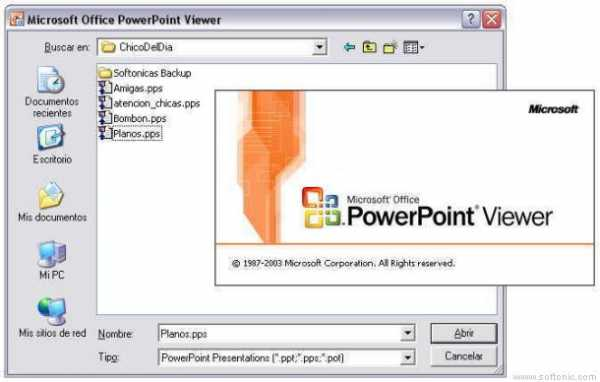
The user interface of PowerPoint Viewer 2007 is straightforward and functional, reflecting the design principles of its era. It features a minimalistic layout with a clear presentation window, navigation controls, and basic menu options. The visual style is simple, with no distractions, focusing entirely on the content being viewed.
Navigating through slides is intuitive, with options to advance manually or use automatic playback. The app responds promptly to user input, ensuring smooth transitions between slides. Although the developer did not list formal performance metrics, its lightweight nature suggests consistent responsiveness across a range of Windows devices, including older systems.
Stability is a key strength, with the app designed to run without crashes or unexpected exits during typical use. The lack of complex features contributes to its reliability. While no specific information was provided about touch or high-DPI support, the interface remains usable on standard desktop displays.
Platform Compatibility & Technical Requirements
PowerPoint Viewer 2007 is designed for the Windows platform and requires a compatible version of the Windows operating system. The software version is 12.0.6425.1000, and the file size is 12.4 MB. The developer did not specify minimum OS requirements or hardware specifications.
Given its release date in 2007, the app is primarily intended for older Windows systems such as Windows XP, Vista, and Windows 7. Compatibility with modern Windows versions (e.g., Windows 10 or 11) may be limited, and users should verify system compatibility before installation. The app does not support mobile platforms such as Android or iOS.
Pros and Cons
Pros
- Free to download and use, with no licensing fees.
- Supports multiple PowerPoint file formats, including legacy and modern variants.
- Minimal system resource usage due to its lightweight design.
- Can open password-protected presentations securely.
- Stable performance with no known issues during standard viewing sessions.
Cons
- Does not allow editing or modification of presentation content.
- Not compatible with mobile operating systems like Android or iOS.
- May not function properly on newer Windows versions without compatibility mode.
- Outdated interface and lack of modern UX enhancements.
- No official updates or support since its initial release in 2007.
FAQ
Is PowerPoint Viewer 2007 safe to download and install?
Yes, the app is developed by Microsoft Corporation and is available through official channels. It is free of malware and does not require third-party installers.
Can I use PowerPoint Viewer 2007 on Windows 10 or Windows 11?
Compatibility with newer Windows versions is not guaranteed. Users may need to run the installer in compatibility mode or use alternative viewers for optimal results.
Does PowerPoint Viewer 2007 support PPTX files?
Yes, the app supports PPTX, along with PPT, PPTM, PPSX, PPSM, POT, POTX, and POTM file formats.
Can I open password-protected presentations with this viewer?
Yes, the application can open password-protected presentations, provided the user knows the correct password.
Is PowerPoint Viewer 2007 still supported by Microsoft?
Microsoft no longer provides updates or official support for PowerPoint Viewer 2007. It remains available for use but is considered a legacy tool.
Final Thoughts
PowerPoint Viewer 2007 remains a practical and efficient solution for users who need to view PowerPoint presentations without making changes. Its lightweight design, broad file format support, and free availability make it a valuable tool, particularly for those working with older systems or legacy content. While it lacks modern features and is not compatible with mobile platforms, its core functionality remains reliable for its intended purpose.
It is most beneficial for educators, professionals handling archived presentations, and individuals who prioritize security and simplicity over editing capabilities. For users seeking a no-frills, secure way to open PPT and PPTX files, PowerPoint Viewer 2007 delivers consistent value.
Download PowerPoint Viewer 2007 now to access your presentations without the need for full Office software.
Guides & Tutorials
How to install PowerPoint Viewer 2007
- Click the Download button above.
- Once redirected, accept the terms and click Install.
- Wait for the PowerPoint Viewer 2007 download to finish on your device.
How to use PowerPoint Viewer 2007
This software is primarily used for its core features described above. Open the app after installation to explore its capabilities.
User Reviews
No reviews yet. Be the first to share your experience.
You may also like
more
Que no te pillen¡
About !Que no te pillen¡Reviewed by Jason A. BilbreyShow MoreShow Less

3D Combat Zone
About 3D Combat ZoneOriginally released in 1983, 3D Combat Zone immerses players...

666: El día del portal
About 666: El día del portalOn June 6, 2006, Agent P. Stone uncovers a sinister...

80 in 1 Best Flash games
About 80 in 1 Best Flash games 80 in 1 Best Flash games is a collection of 80 fl...

ABYSS SEEKERーーWhat Do You See Deep in The Abyss
About ABYSS SEEKERーーWhat Do You See Deep in The AbyssIn ABYSS SEEKER, players...

ACA NEOGEO THE KING OF FIGHTERS 2002 for Windows
About ACA NEOGEO THE KING OF FIGHTERS 2002 for WindowsTHE KING OF FIGHTERS 2002,...